Operators-old
The “Operators” tab in the cairo.BI system allows full management of users who have access to the platform – from adding new accounts to assigning roles, data sources, and permissions.
It serves as a central administration panel for controlling who can access which reports and data.
Operator List
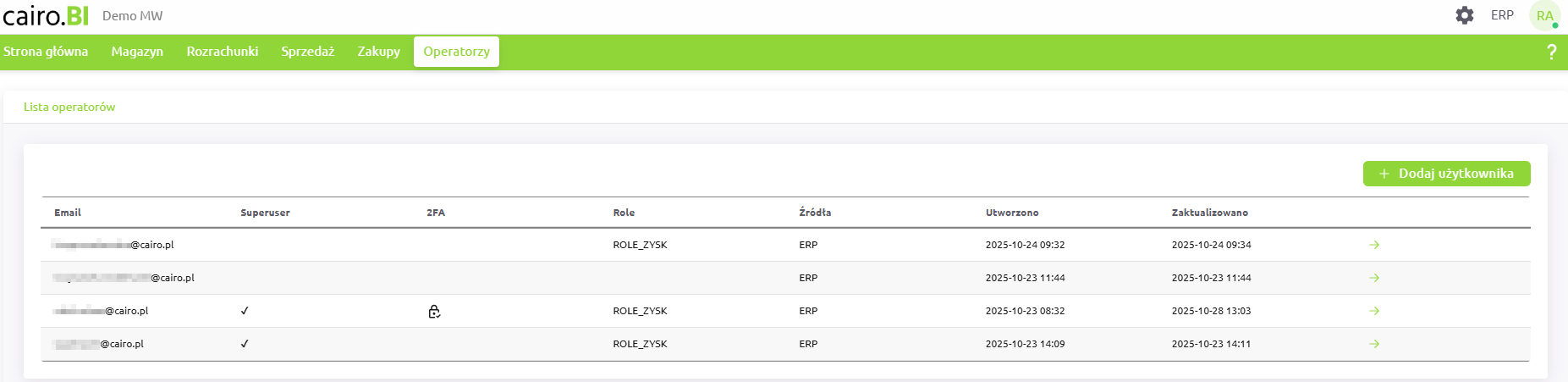
The main screen displays a list of all registered users in the system.
Each record contains key information:
-
Superuser – indicates a user with full administrative permissions,
-
2FA – information on whether two-factor authentication (Two-Factor Authentication) is enabled,
-
Role (Roles) – set of permissions assigned to the user,
-
Source (Sources) – system from which the user’s data is drawn (e.g., ERP, B2B),
-
Created / Updated – timestamps of account creation and last modification.
Each operator has an ➜ icon, which opens the user’s detailed profile.
Operator Profile
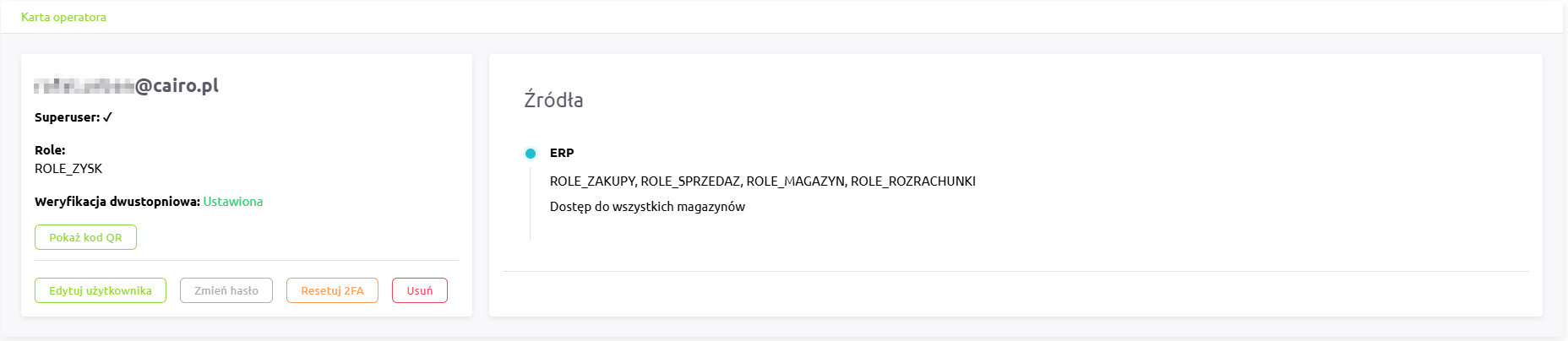
The operator profile view displays detailed information about the selected user, including:
-
the user’s email address,
-
Superuser status,
-
assigned roles,
-
two-factor authentication (2FA) status,
-
list of available data sources and roles assigned to each,
-
information about warehouse access (e.g., “Access to all warehouses”).
From the profile screen, the following actions are available:
-
Edit user – modify user details, roles, sources, or permissions,
-
Change password – reset the user’s password,
-
Reset 2FA – remove the existing two-factor authentication configuration,
-
Delete – permanently remove the user account from the system.
If two-factor authentication is enabled, a “Show QR code” option appears, allowing the user to re-pair their authentication app.
Adding a New Operator
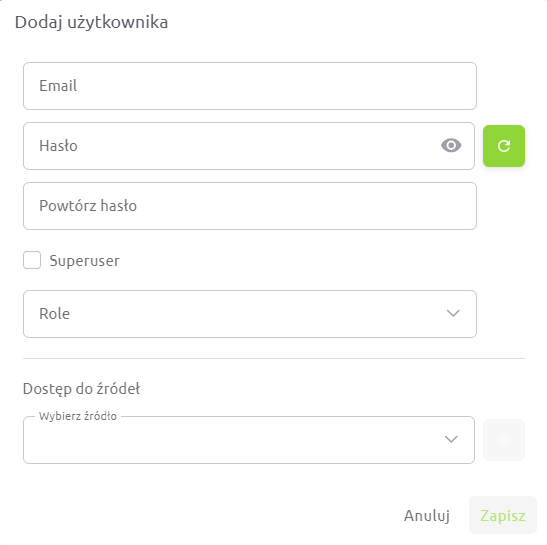
To add a new user, click the “+ Add user” button in the operator list.
In the form, you can specify:
-
user’s email address,
-
password and confirmation,
-
Superuser status,
-
assigned roles,
-
data sources (e.g., ERP, B2B),
-
warehouses the user has access to (all or selected ones).
Roles and Permissions
Roles define which sections of the system a user can access:
-
ROLE_MAGAZYN – access to warehouse reports and analytics,
-
ROLE_ROZRACHUNKI – access to receivables, liabilities, and balance reports,
-
ROLE_SPRZEDAZ – access to sales analytics and reports,
-
ROLE_ZAKUPY – access to purchasing reports,
-
ROLE_ZYSK – access to profit and margin data.
If an operator does not have the ROLE_ZYSK permission, all columns and charts related to profit and % profit will be hidden or displayed as 0.
When this role is enabled, the user gains full visibility into profitability and margin data.
Data Sources
Each operator can have access to different data sources – e.g., ERP systems, B2B modules, and, in the future, other integrated environments.
Administrators can assign one or multiple sources to a user, precisely controlling which data is available to them.
Warehouse Access
When assigning roles and sources, it is also possible to define access to specific warehouses.
Administrators can:
-
grant access to all warehouses, or
-
select specific locations (e.g., [CE] Central, [03] Warehouse 03, [02] Warehouse 02).
This ensures each user sees only the data relevant to their scope of work.
Superuser
A Superuser has full access to all system data and functionalities.
They can:
-
add, delete, and edit operators,
-
assign roles, sources, and warehouse access,
-
manage permissions,
-
configure system settings.
It is recommended to grant Superuser status only to trusted system administrators.
Two-Factor Authentication (2FA)
Two-factor authentication (2FA) enhances login security.
Once enabled, the user must provide a one-time code from an authentication app in addition to their password.
-
2FA can be activated or reset only during operator editing.
-
When active, the operator profile displays the status “Enabled” and a “Show QR code” button.
-
After resetting or deactivation, the status changes to “Disabled”.
The “Operators” tab in cairo.BI provides full control over user accounts, roles, access levels, and authentication security — ensuring efficient and safe management of your analytics environment.