All values are calculated based on sales documents (WZ, PG, GP, ZW).
All values are converted to PLN according to the exchange rate of the previous day, ensuring consistent presentation regardless of the document currency.
--- ### Sales by warehouse [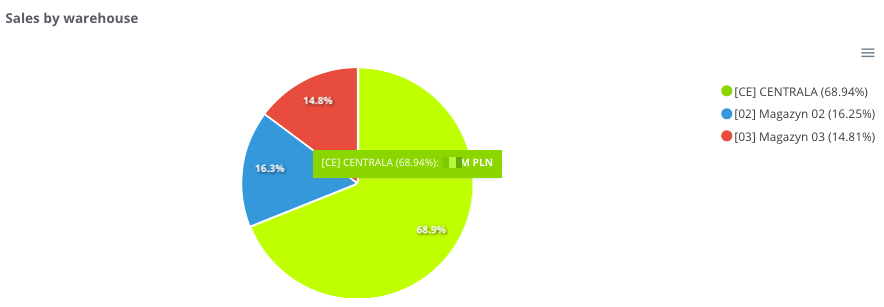](https://help.cairo.pl/uploads/images/gallery/2026-04/PaHxmhTDkkT2JlBQ-image.png) **“Sales by warehouse”** – the chart presents the **share of sales broken down by individual warehouses**. It allows users to see which warehouse generates the largest contribution to the company’s total sales. The chart displays: - **Individual warehouses** – each marked with a different color, - **Percentage share of sales** – showing what portion of total sales each warehouse represents. Thanks to this chart, users can easily compare **sales structures by warehouse location** and identify **which warehouses play a key role** in overall sales performance. --- ### **Sales by warehouse - table** [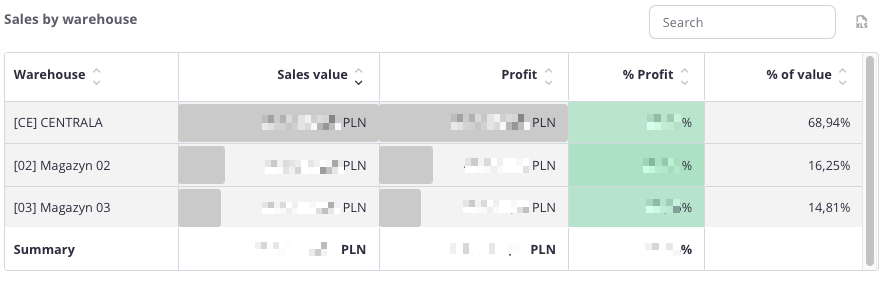](https://help.cairo.pl/uploads/images/gallery/2026-04/HTdHlaej7q1cFcKq-image.png) **“Sales by warehouse – table”** – this summary presents **sales data broken down by individual warehouses**. It allows users to see how each warehouse contributes to the company’s **total sales and profit**. The table includes the following fields: - **Warehouse** – name of the warehouse, - **Sales value** – total sales completed through the given warehouse, - **Profit** – financial result generated by sales from that warehouse, - **% Profit** – percentage share of profit in total sales value, - **% Value** – percentage share of the warehouse in total company sales. The table uses **color highlighting**: - **Green** – the more intense the color, the higher the profit percentage, - **Red** – indicates negative values, representing a loss. - **Grey bar** – its length corresponds to the scale of the value; the longer the bar, the higher the sales or profit amount. Thanks to this, the user can quickly compare the **profitability of sales** **across different warehouses** and evaluate their **share in total sales structure**. The table includes a **search field** that allows narrowing the data to selected warehouses. In such cases, **summaries automatically adjust** **to the filtered results**. Additionally, data can be **sorted by clicking column headers** – for example, to arrange warehouses by **sales value**, **profit**, **or profitability**. --- ### **Sales by warehouse in the last 12 months - Top 5** [](https://help.cairo.pl/uploads/images/gallery/2026-04/EE4OuAi73tWyIU4l-image.png) **“Sales by warehouse in the last 12 months - Top 5”** – the chart presents the **sales value and profit broken down by individual warehouses and monthly periods**. It allows users to track how results have changed over time and which warehouses contributed the most to overall sales. The chart displays: - **Sales** – total sales value assigned to each warehouse, - **Profit** – financial result generated from that sales volume, - **Timeline axis** – enabling month-by-month analysis, - **Comparison between warehouses** – showing which warehouse generated higher revenue and profit in a given period. Thanks to this chart, users can easily assess **sales and profitability trends** and determine whether warehouse performance is **stable, increasing, or declining** over time. ---